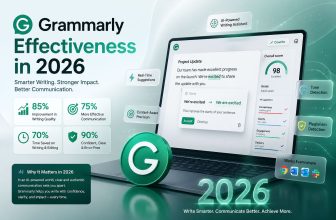
Grammarly has transformed from a simple grammar checker to one of the most powerful writing assistants on the market today. What started as a tool to catch basic spelling errors has evolved into a comprehensive platform that helps millions of users communicate more effectively.
The world of AI grammar tools has changed dramatically since the early days. Grammarly now offers sophisticated features like tone detection, plagiarism checking, and generative writing capabilities that go far beyond basic proofreading. However, with various subscription tiers and an expanding feature set, many potential users wonder if the investment is justified.
This in-depth review examines Grammarly’s current capabilities, pricing structure, and real-world performance in 2025. We’ll explore how the platform has evolved under new leadership, analyze its core features, and help you determine if Grammarly is truly worth your money based on your specific writing needs.

Grammarly in 2025: What Has Changed?
Over the past few years, Grammarly has undergone a dramatic transformation that extends far beyond its original mission. Once known primarily as a tool to catch typos, the platform has evolved into something much more sophisticated and ambitious.
From grammar checker to AI assistant
The Grammarly of 2025 bears little resemblance to its earlier iterations. Rather than simply correcting grammar errors, it now functions as a comprehensive AI writing assistant that supports users throughout the entire writing process. The platform now helps at every stage—from generating ideas on a blank page to polishing the final draft.
What truly sets today’s Grammarly apart is its personalization capabilities. The AI now tailors suggestions based on both the content you’re writing and your intended audience . Moreover, unlike many competitors, Grammarly works directly in the apps and websites where you already write—eliminating the need to switch between different tools .
The company has introduced specialized AI agents that make your writing clearer and more impactful. Additionally, they’ve launched “docs,” a new AI writing surface that offers real-time support during every phase of writing . This evolution reflects Grammarly’s vision of AI as a collaborative partner rather than just a correction tool.
The rebrand to Superhuman Platform Inc.
In a bold strategic move, Grammarly announced in 2025 that it was changing its company name to Superhuman . This rebrand unites three distinct products—Grammarly, Coda, and Superhuman Mail—under a single umbrella, marking the company’s transition into an AI-native productivity platform .
The new Superhuman suite includes four core products: the familiar Grammarly writing assistant, Coda’s all-in-one workspace, Superhuman Mail’s intelligent inbox, and a brand-new offering called Superhuman Go . Go functions as an AI assistant that works across every application and tab, offering proactive help by connecting to over 100 apps to deliver relevant information precisely when needed .
“Superhuman represents a fundamental shift in how we think about AI at work,” explained Shishir Mehrotra, CEO of Superhuman. “The name Superhuman reflects our belief that AI should amplify human capability, not replace it or force people to adapt to its limitations” .
For existing Grammarly customers, the company has reassured that nothing changes about the products they currently use—they simply gain access to new capabilities that make everything work better together .
New leadership and acquisitions
The transformation began in earnest with Grammarly’s acquisition of productivity platform Coda, which brought along Coda’s CEO and Co-Founder Shishir Mehrotra as the new CEO of Grammarly . Later, the company acquired Superhuman, the AI-native email app known for helping users respond to emails up to two days faster .
These acquisitions were made possible partly by a substantial $400 million growth financing round aimed at supporting “strategic acquisitions” . Together, they accelerate Grammarly’s evolution into an AI productivity platform, positioning email as a crucial communication channel in the company’s vision .
Despite these changes, Grammarly’s founders remain actively involved. Max Lytvyn leads growth, focusing on user acquisition and marketing, while Alex Shevchenko works closely with the product team on new developments .
The company now serves approximately 40 million daily users , including over 50,000 organizations and 3,000 universities with revenue reaching $200 million and a valuation that hit $13 billion in 2021 .
Core Features and How They Work
Let’s explore what makes Grammarly’s toolkit so powerful in 2025. The platform now offers a sophisticated suite of writing features that go far beyond basic proofreading.
Grammar and spell check
In 2025, Grammarly’s core grammar and spelling checker has become significantly more advanced. The system now detects complex errors in advanced sentence structures and identifies issues in technical writing that earlier versions might have missed. Particularly impressive is its ability to catch typos in industry-specific terms, slang expressions, and regional spellings .
The grammar checker works seamlessly across more than one million websites, applications, and browsers on both desktop and mobile devices, ensuring consistent writing quality regardless of where you’re typing . For basic needs, Grammarly Free covers grammar, spelling, punctuation, conciseness, and tone detection fundamentals .
Tone and style suggestions
Grammarly’s tone detector analyzes your word choice, phrasing, punctuation, and even capitalization to instantly identify how your writing might sound to readers . This feature helps you ensure your message conveys the right level of positivity, approachability, and confidence.
The platform offers tone rewrite suggestions that provide emotionally intelligent alternatives when your tone might be misinterpreted. For instance, it can transform passive-aggressive statements like “Thanks for wasting my time” into more straightforward phrasing such as “I feel that you wasted my time” . These rewrites help you frame messages more constructively, maintain trust in challenging situations, and create warmer, more personable communication.
Plagiarism detection
Grammarly’s plagiarism checker compares your text against billions of web pages and academic papers in private databases . After scanning, it provides an overall originality score for your document and flags text that may need citation.
The system recognizes eight distinct types of plagiarism:
- Complete plagiarism (presenting someone else’s entire work as your own)
- Direct plagiarism (copying sections without credit)
- Paraphrasing plagiarism (rewording without credit)
- Self-plagiarism (reusing your previous work)
- Patchwork/mosaic plagiarism (subtly integrating plagiarized material)
- Source-based plagiarism (citing sources misleadingly)
- Accidental plagiarism (unintentionally failing to cite sources)
- AI plagiarism (using AI-generated content without disclosure)
Generative AI writing tools
Grammarly’s AI writing capabilities have expanded considerably. The platform now offers on-demand generative AI assistance with several key functions: compose (draft content from a prompt), rewrite (generate new versions customized for tone or length), reply (generate contextual email responses), and ideate (create outlines or draft ideas) .
These tools integrate directly into popular applications like Gmail, Google Docs, Microsoft Word, LinkedIn, and Medium, allowing you to generate content without switching between different programs . Each Grammarly user receives a monthly allowance of prompts they can use .
Authorship detection tool
Grammarly Authorship represents an innovative approach to transparency in the age of AI. Unlike traditional AI detectors that analyze text patterns after submission, Authorship proactively tracks your writing process .
The tool automatically categorizes text sources as you write, distinguishing between content you typed, text pasted from websites, content generated with AI, and text modified with Grammarly’s suggestions . Furthermore, it creates comprehensive reports showing what percentage of your work is original, AI-written, or copied from external sources.
A standout feature is the “replay” function, which lets you or your audience watch a replay of your writing process from the first paste to the last keystroke, providing clear evidence of how your document was created.
Plans and Pricing: What Do You Get?
In 2025, Grammarly’s pricing structure has evolved alongside its expanding feature set. Understanding the differences between plans is crucial before deciding which one fits your needs and budget.
Free vs Premium vs Business
Grammarly now offers three distinct service tiers: Free, Pro (formerly Premium), and Enterprise. The Free plan costs nothing and provides basic writing assistance, including spelling and grammar checks, tone detection, and limited access to generative AI with 100 prompts per month .
The Pro plan (rebranded from Premium) starts at PHP 707.25 per member monthly when billed annually, or PHP 1768.13 if billed monthly . For teams and organizations, the Enterprise plan offers custom pricing based on team size and specific requirements.
First, it’s worth noting that Grammarly changed its pricing from ‘Premium’ to ‘Pro’ in 2025, essentially offering Business plan features at the old Premium price point . This represents improved value for individual subscribers who now access team-oriented features previously unavailable to them.
What’s included in each plan
The Free plan covers fundamental writing needs: basic grammar correction, spelling checks, and limited tone detection. It serves as an entry point for casual users who need occasional writing assistance.
Pro subscribers receive considerably more capabilities:
- Full-sentence rewrites with one click
- Tone adjustments and fluency improvements
- Plagiarism detection across billions of web pages
- Detection of AI-generated content
- 2,000 monthly generative AI prompts (up from 100 in Free)
- Priority support through help center
The Enterprise tier builds on Pro features with advanced security and administrative controls:
- Unlimited AI prompts per member
- Dedicated customer support
- BYOK encryption for sensitive content
- Custom roles and permissions
- Data loss prevention tools
- Cost center visibility for large organizations.
Essentially, as you move up the tiers, you gain not just writing assistance but also team collaboration features and enterprise-grade security.
Is the Premium plan worth it?
According to users, Grammarly Pro offers substantial value, especially for professional writers, content creators, and business teams. The Pro plan significantly reduces writing errors—with internal reports suggesting Pro users make 76% fewer mistakes compared to free users .
For professionals who rely on writing daily, the advanced tone detection and full-sentence rewrites often justify the cost. At approximately PHP 707.25 monthly (annual billing), Pro is certainly more affordable than hiring a professional editor, which could cost upwards of PHP 2946.88 per hour .
Nevertheless, the value proposition varies by user type. Students and educators benefit from plagiarism detection, whereas business professionals might find more value in tone adjustments and brand consistency features. Content creators appreciate the expanded AI writing prompts, which help overcome writer’s block and accelerate content production.
Ultimately, the free version works well for occasional users seeking quick checks before sending emails, whereas Pro proves most beneficial for those needing to consistently produce polished, error-free content .
User Experience: Pros and Cons
Using a tool daily is different from reading about its features on paper. With 30 million daily users, Grammarly has clearly won a loyal following, yet no software is without its drawbacks. Let’s examine what actually works well and where users encounter friction.
Ease of use and integrations
Grammarly’s widespread appeal stems largely from its seamless integration across platforms. The tool functions in over one million apps and programs , allowing users to improve their writing without constantly switching between tabs. Compatibility extends to:
- Microsoft Word and Outlook
- Most email clients including Gmail and Apple Mail
- Desktop applications for both Windows and Mac
- Mobile keyboards for iOS and Android
First-time users typically appreciate how Grammarly stays in the background until needed. The interface remains intuitive despite adding sophisticated features. Consequently, even non-technical users can immediately benefit without a learning curve. Furthermore, users can easily disable the tool for specific writing tasks when they prefer no assistance.
Common complaints and limitations
Despite its versatility, Grammarly imposes several restrictions worth noting. Each account is limited to five devices , and users can check only 300 documents or 150,000 words in any 30-day period . Additionally, individual uploads are capped at 100,000 characters .
Beyond these technical constraints, many users report accuracy issues. The tool occasionally flags correct grammar as errors and makes questionable suggestions that can alter intended meaning . Writers of creative content, fiction, or poetry often find Grammarly’s focus on formal business writing frustrating, as it tends to sanitize unique writing styles .
Performance concerns have likewise emerged. The software can significantly impact system resources, with some users reporting CPU usage spikes up to 99% . This resource consumption may cause noticeable slowdowns, especially on older computers.
Security and privacy concerns
For many users, data security remains a primary concern. Grammarly processes text on external servers , yet implements several protective measures. All data is encrypted both in transit and at rest using TLS 1.2 protocol and AES-256 encryption .
To address privacy worries, Grammarly automatically excludes sensitive fields such as passwords and payment information . The company also emphasizes it never sells user content and complies with major regulations including GDPR, CCPA, and HIPAA .
Those needing maximum confidentiality can selectively disable Grammarly for sensitive documents or use its “ignore” feature for specific text
. Unfortunately, complete privacy requires not using the service at all—a tradeoff inherent to any cloud-based writing assistant.
How to Use Grammarly AI Easily
Using Grammarly AI is extremely simple, allowing you to check and improve the quality of your English writing in just a few steps.
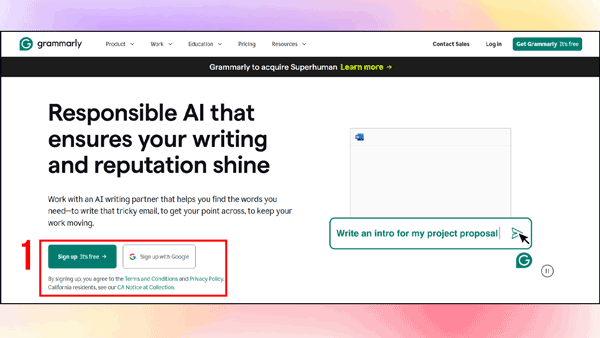
Step 1: Visit grammarly.com and choose a suitable sign-in method.
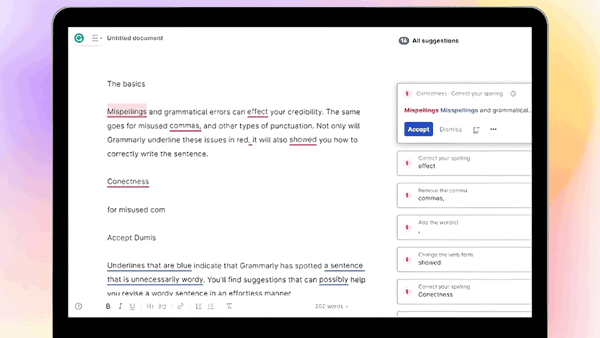
Step 2: Click New doc to open the editor and start writing your content.
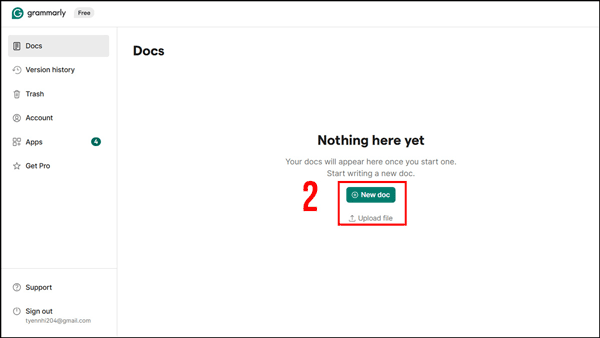
Grammarly will automatically suggest grammar, spelling, and clarity improvements.
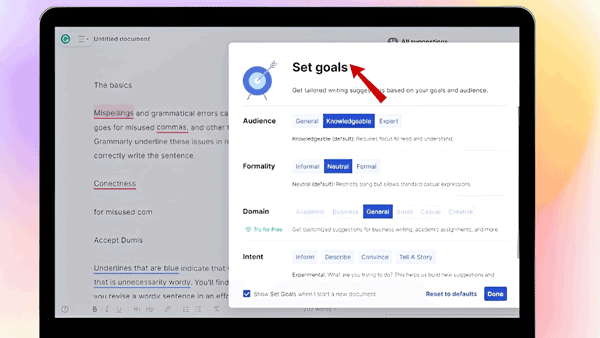
You can also set specific writing goals—such as Business, Academic, or Email—to help the AI optimize its suggestions.
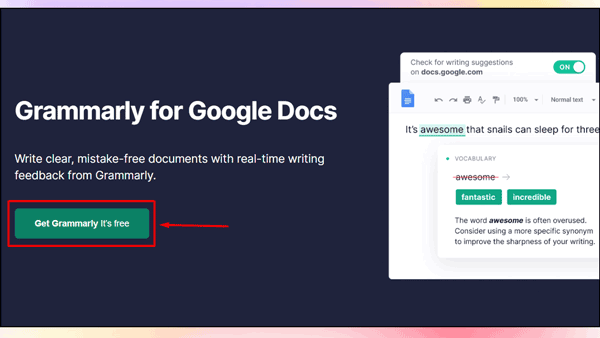
Step 3: To use Grammarly in Word and Outlook, go to the Grammarly for Google Docs download page and select Get Grammarly — It’s free.
Step 4: Click Add to Chrome, then choose Add extension to install the Grammarly AI browser tool into Google Chrome.
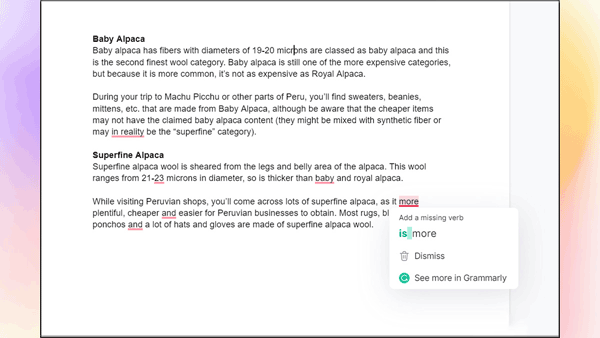
Step 5: Open any English document in Google Docs; errors will be underlined in red. Click on them to see Grammarly AI’s quick correction suggestions.
Who Should Use Grammarly in 2025?
With data showing specific benefits for different groups, Grammarly has evolved to serve distinct user categories in 2025. Let’s examine who stands to gain the most from this AI writing tool.
Students and educators
Students report remarkable benefits from Grammarly’s educational tools, with 94% saying it helped improve their grades . Beyond academic performance, 87% of students save over one hour weekly on writing tasks. The platform offers specialized features like AI Grader (providing rubric-aligned feedback) and Citation Finder (automatically generating properly formatted citations).
Educators benefit through comprehensive teaching support, as Grammarly gives institutions control over generative AI features . Notably, the Authorship tool has reduced academic integrity violations by 96% or more , creating transparency between students and faculty.
Business teams and professionals
Organizations deploying Grammarly save an average of PHP 294,687.90 annually per employee , justifying the investment through tangible productivity gains. Indeed, 93% of professionals report getting more work done with the platform .
The tool especially benefits teams needing consistent communication, with features like Knowledge Share surfacing relevant company information as employees type . Tellingly, four in five professionals say Grammarly helps them gain buy-in through better communication .
Writers and content creators
Journalists can produce engaging, mistake-free articles efficiently , whereas marketers use it to craft compelling campaigns and blog posts. Content creators value the platform’s ability to maintain consistent voice across different writing contexts.
Surprisingly, even fiction writers find value, although Grammarly’s strengths primarily benefit shortform writing under 1,000 words .
Conclusion
Grammarly has undeniably evolved from a simple grammar checker into a sophisticated AI writing assistant that serves millions of users daily. Throughout this transformation, the platform has maintained its core strength—helping people communicate more effectively—while expanding into new territories with generative AI tools, authorship detection, and comprehensive writing support.
The rebranding to Superhuman Platform Inc. marks a significant turning point for the company, reflecting its ambitious vision of AI as a collaborative partner rather than just a correction tool. This strategic shift, coupled with powerful acquisitions and new leadership, positions Grammarly at the forefront of AI-native productivity solutions.
Whether Grammarly justifies its cost ultimately depends on your specific writing needs. Students and educators benefit from improved grades and academic integrity features. Business professionals save considerable time while maintaining consistent communication standards. Content creators and writers gain efficiency without sacrificing quality.
The free version certainly offers value for occasional users seeking basic writing assistance. However, those who write professionally or frequently will find the Pro plan’s advanced features—including tone adjustments, plagiarism detection, and expanded AI capabilities—worth the investment. After all, the reported productivity gains and error reduction translate into tangible benefits that often exceed the subscription cost.
Though no tool is perfect—as evidenced by occasional accuracy issues and resource consumption concerns—Grammarly continues to set the standard for AI writing assistance in 2025. The platform balances powerful features with user-friendly design, making better writing accessible to nearly anyone regardless of their technical expertise.
First-time users might start with the free version to test the waters. Afterward, those who find themselves regularly relying on the tool should consider upgrading to unlock its full potential. The decision comes down to how much you value polished, effective communication in your personal and professional life.